
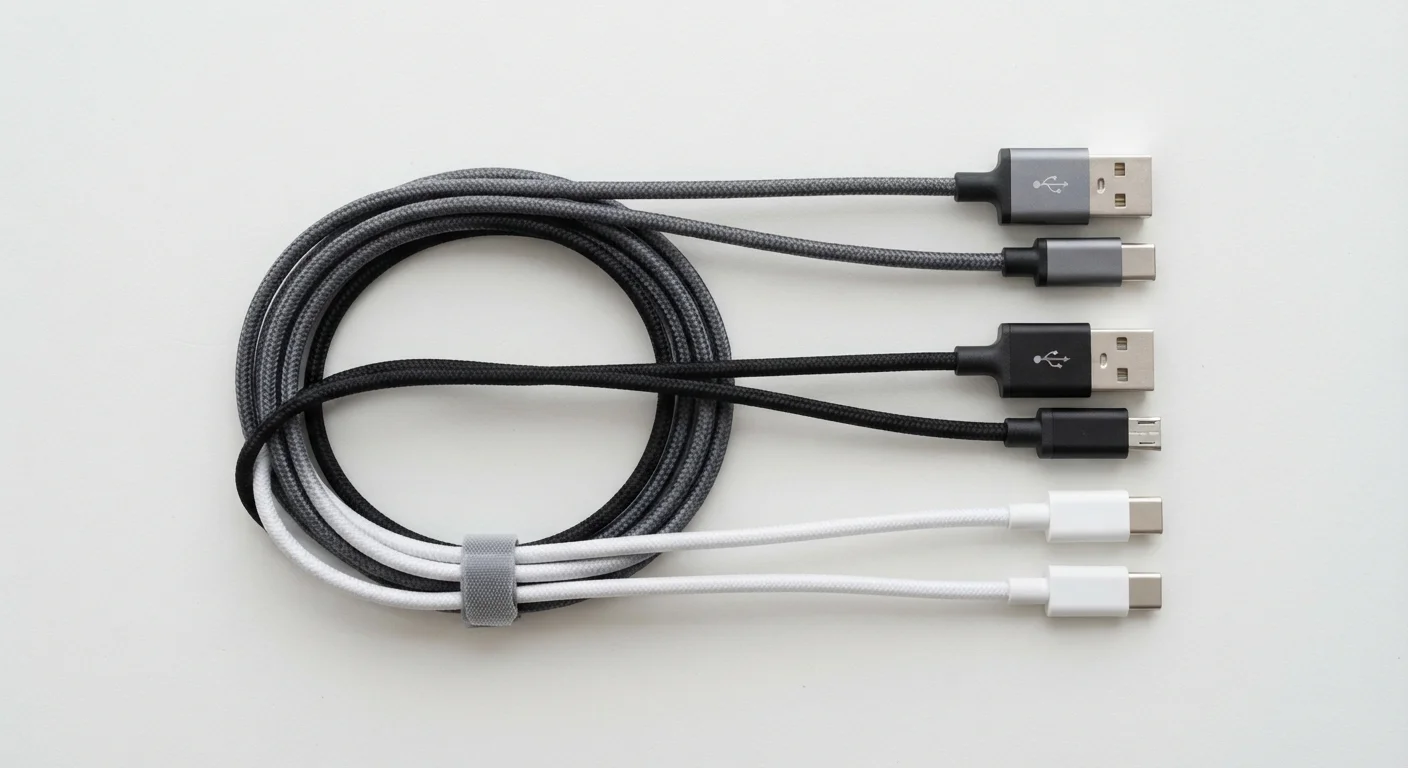
Why There Are So Many USB Connector Types
USB stands for Universal Serial Bus — but the word "universal" has always been a bit optimistic. Since the standard was introduced in the mid-1990s, the connector shape has changed multiple times as device makers demanded faster speeds, smaller ports, and more power delivery. The result: at least half a dozen connector shapes that all carry the USB name but look nothing alike.
The good news is that most people only ever deal with three of them: USB-A, USB-C, and Micro USB. Understanding what each one looks like and where it's used will save you from buying the wrong cable or wondering why your charger won't fit.
| Most common connector on older devices | USB-A |
| Current dominant standard for new devices | USB-C |
| Previous Android charging standard | Micro USB |
| USB-C insertion orientation | Either way — fully reversible |
| Maximum USB 2.0 data speed | 480 Mbps (USB Implementers Forum) |
| Maximum USB4 data speed | Up to 40 Gbps (USB Implementers Forum) |
The Three Connectors You'll Actually Encounter
USB-A
USB-A is the classic rectangular plug that has been on computers, wall adapters, and USB hubs for decades. It only inserts one way — which is why it often takes two tries. You'll find USB-A ports on most laptops made before 2020, desktop computers, TVs, game consoles, and wall chargers. Cables with USB-A on one end are often used to connect a device to a power source or computer.
USB-C
USB-C is the small, oval-shaped connector with a fully symmetrical design — meaning it can be inserted either way up. It has become the dominant standard for modern smartphones, tablets, laptops, and accessories. USB-C supports faster data transfer, faster charging, and in some configurations can carry video signals. Many new devices — including most Android phones, MacBooks, and iPads — now use only USB-C. The European Union has also mandated USB-C as a common charging port for consumer electronics sold in Europe.
Micro USB
Micro USB is a small, trapezoidal connector that was the Android charging standard for roughly a decade before USB-C took over. It inserts only one way. You'll still find it on older Android phones, Bluetooth speakers, e-readers, and some smart home accessories. It charges and transfers data but is slower than USB-C and carries less power.
USB-A
The classic rectangular USB connector found on computers, wall adapters, and USB hubs. It has been in widespread use since the late 1990s and only inserts in one orientation.
USB-C
A small, oval USB connector that can be inserted either way up. It supports faster charging and data transfer than older connector types and is now the standard on most new smartphones and laptops.
Micro USB
A compact, trapezoidal USB connector used on many Android smartphones and accessories before USB-C became widespread. It inserts in only one direction.
USB Version
The technical generation of the USB standard (e.g., USB 2.0, USB 3.2) that determines maximum data transfer speed. The version is separate from the connector shape.
Power Delivery (USB PD)
A USB charging standard that allows compatible USB-C cables and chargers to deliver higher wattage, enabling faster charging for laptops, tablets, and phones.
Mini USB (a brief mention)
You may occasionally encounter Mini USB — a slightly larger trapezoidal plug — on older digital cameras and MP3 players. It's largely obsolete but still exists on some niche devices and chargers you might find in a drawer.
USB Speed Versions: What the Numbers Mean
Separate from the connector shape, USB also has versions that define how fast data travels. These are often printed on packaging or listed in specs:
- USB 2.0 — Transfers data at up to 480 Mbps. Common on older cables and budget accessories. Fine for charging and low-demand use.
- USB 3.0 / USB 3.1 / USB 3.2 — Substantially faster, up to 20 Gbps depending on the subversion. Look for the blue color coding inside USB-A ports as a quick indicator.
- USB4 — The newest generation, offering up to 40 Gbps and found primarily on USB-C connectors.
A cable's connector shape and its speed version are two different things. A USB-C cable is not automatically fast — the version of USB it supports matters just as much as the shape.
Cable Shape ≠ Cable Speed
A USB-C port or cable does not guarantee fast charging or fast data transfer on its own. The USB version the cable and device support determines actual performance. When speed matters — such as transferring large files or fast-charging a laptop — check the spec sheet for the USB version, not just the connector shape.
480 Mbps
USB 2.0 maximum data transfer speed
USB 2.0 remains widely used for charging and low-demand accessories despite being over two decades old.
40 Gbps
USB4 maximum data transfer speed
USB4 operates exclusively over USB-C connectors and is found on high-end laptops and accessories.
100W
Maximum power via USB Power Delivery
USB Power Delivery over USB-C can deliver enough wattage to charge most laptops, per the USB Implementers Forum spec.
Practical Tips for Buying and Using USB Cables
When you need a new cable, ask yourself three questions: What connector does my device use? What connector does my charger or computer use? And do I need fast charging or fast data transfer, or just basic power?
Most wall adapters sold today have USB-A ports, so a USB-A to USB-C cable is one of the most common purchases. If your laptop and phone both have USB-C, a USB-C to USB-C cable handles both charging and data. For older devices, a USB-A to Micro USB cable is often what you need.
Cable quality matters for safety and reliability. Cables that meet USB standards are less likely to damage batteries or overheat. If a cable feels unusually flimsy or runs very hot during charging, stop using it and replace it.
USB Implementers Forum (USB-IF)
The official industry body that defines USB standards. Their website offers authoritative specifications and a certified cable/product search tool to verify compliance.
Your device's user manual
The quickest way to confirm exactly which cable type and charging standard your specific device supports, without guessing from the port shape alone.
